


Becoming a homeowner changes how you think about security.
Before buying my home, I used to think that a security camera was mainly something you installed to record a burglary. After becoming a homeowner—and especially as a dad—I realised that home security is much more than watching for strangers.
It is about knowing who is standing at your front door before you open it. It is about checking the garden when your child is playing outside. It is about giving your wife, child or another family member an easy way to call you when they need help.
It is also about being able to manage your lights, cameras, sensors and doorbell from one place.
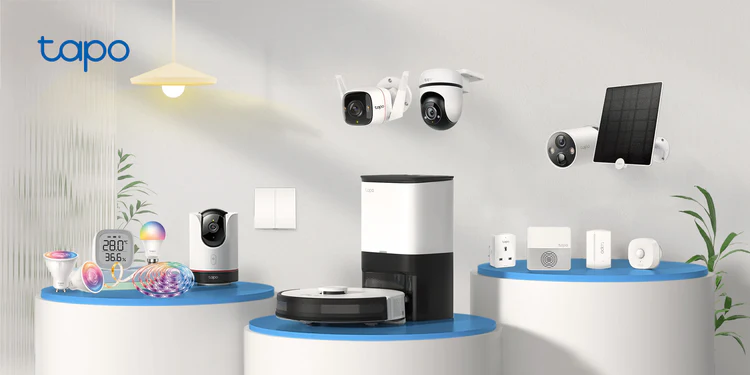
That is why I started using Tapo products around my home.
I did not purchase everything together. Like most new homeowners, I already had enough expenses after moving in. There was furniture to buy, flooring to arrange, appliances to install and hundreds of other small things that suddenly become necessary when you own a house.
I started slowly, adding one product at a time.
That is probably the best thing about Tapo. You do not need to spend thousands of euro or install a complicated security system from the beginning. You can start with the device you need most and gradually build a complete smart-home system around it.
For anyone considering the same setup, this is the Tapo product range I purchased and recommend.
Why I Chose Tapo for My Home
I wanted a home-security system that was easy to understand and did not require a major professional installation.
My requirements were simple:
- It needed to be affordable.
- It needed to be easy to install.
- It needed to work from one mobile application.
- It needed to be expandable.
- It needed to be useful for the entire family.
- It needed to offer good battery performance.
- It needed to work without forcing me into a costly subscription.
Tapo offered nearly everything I was looking for.
You can begin with a single camera or video doorbell and then add smart bulbs, sensors, plugs, buttons and a hub when you are ready.
For a new homeowner, that makes a big difference. You can build the system according to your actual needs rather than paying for equipment you may never use.
Technology for the home is also developing very quickly. Products that once felt expensive or complicated are becoming practical household tools. Anyone interested in this wider change can also explore the technology and digital-living coverage on Media Digest.
Security Is About More Than Burglary
When people talk about home security, they usually think about stopping someone from entering the house.
Of course, that is important. However, security inside the home matters just as much.
As a parent, I want to know that my child can get my attention when needed. I want to see what is happening outside without immediately opening the door. I want to check whether the garden gate has been opened, whether someone has approached the driveway or whether a delivery has arrived.
A good smart-home system should help during both serious situations and ordinary daily life.
Tapo does that surprisingly well.
The camera protects the outside of the house.
The video doorbell helps control the entrance.
The smart bulbs make dark areas easier to manage.
The sensors provide alerts when something changes.
The smart button gives family members a simple way to activate a routine or call for attention.
Individually, each product is useful. Together, they become a proper household system.
The Tapo Smart Button Is Much More Useful Than It Looks
The Tapo smart button looks like a very simple device.
However, it can become one of the most useful parts of the entire setup.
You can configure it to control compatible lights, activate devices or trigger an alert through the Tapo system. Depending on how you set it up, a single press, double press or rotation can perform a different action.
This creates many useful possibilities.
You could use it beside the bed to switch off the downstairs lights.
You could put one near the front entrance to activate a leaving-home routine.
You could place one in your child’s bedroom so they can alert you during the night.
You could also place one in a safe and dry part of the bathroom so a family member can call you if assistance is needed.
It is a small product, but it can have many different purposes.
Using the Button for a Child Near the Bathroom
As a dad, this was one of the first practical uses that came to my mind.
A child can sometimes become nervous in the bathroom or may simply need help. They might need a towel, help getting out or immediate attention from a parent.
A smart button can provide a simple way for them to call you.
However, I would never place an electronic button directly above the bathtub or somewhere it could become wet. It should be mounted on a dry wall, away from water, steam and the splash area.
The child should be able to reach it safely without standing up in the bath or stretching over water.
Once the child is old enough to understand it, you can explain that pressing the button means they need Mum or Dad.
The button could then:
- Trigger a sound through the Tapo hub.
- Turn on a particular smart bulb.
- Activate a visual alert.
- Start another compatible household routine.
It provides another way for your child to communicate with you without needing to shout through the house.
Naturally, it should be treated as an additional family-convenience device rather than a replacement for supervision. A young child should never be left unattended in or near a bathtub.
A Panic or Assistance Button for Your Wife or Family
The button can also work as a simple assistance button for your wife, an older family member or a guest.
For example, it could be placed:
- Beside the bed.
- Near a chair used by an elderly relative.
- On a dry bathroom wall.
- In a home office.
- Near the kitchen.
- In a child’s bedroom.
If someone feels unwell, slips or simply needs help, pressing the button can get your attention.
I would not describe it as a replacement for a certified medical alarm or professionally monitored panic system. However, as an additional household alert, it can be extremely helpful.
Sometimes you do not need a complicated solution. You just need a simple button that allows one family member to alert another.
That is exactly what this product can provide.
Why the Tapo Solar Camera Makes Sense
The solar-powered camera is another product that makes a lot of sense for homeowners.
Installing a traditional wired camera outside can become complicated. You may need to drill through walls, run cables across the property or hire an electrician to create an outdoor power supply.
A solar camera removes much of that difficulty.
You install the camera where you need coverage and place the solar panel where it can receive the best available daylight.
This is especially useful for:
- The driveway.
- The back garden.
- A side entrance.
- A garden shed.
- A rear gate.
- The area around bins.
- A detached garage.
- Parts of the property without an electrical socket.
As someone living in Ireland, I initially wondered whether a solar camera would receive enough light.
Ireland is not exactly famous for uninterrupted sunshine. However, a solar panel does not necessarily need bright summer sunshine all day. It can use the available daylight to top up the camera battery.
The performance will naturally depend on its position, the season, the amount of activity detected and how frequently you view the live camera.
You still need to install the panel properly. Putting it under a roof, behind a tree or permanently in deep shade will limit the charging performance.
Positioning is important.
Checking the Garden as a Parent
One of the biggest benefits for me is being able to check the garden quickly.
Children can move from one side of a garden to another in seconds. A camera does not replace a parent watching their child, but it provides another useful view of the property.
You can check:
- Whether the child is still in the expected area.
- Whether the garden gate is open.
- Whether another person has entered the garden.
- Whether an animal is outside.
- Whether somebody has approached the shed or rear entrance.
This is the type of practical use that makes the camera feel like more than another technology product.
It becomes part of how you manage your home.
The wider role of family technology can also be seen in products such as mobile home-monitoring robots. Daily Digest has covered this area in its review of the Enabot Ebo Max smart home robot, which combines home monitoring, communication and a mobile camera in one device.
Motion Detection and Instant Notifications
Recording footage is useful, but receiving an alert while something is happening is even more valuable.
When a compatible Tapo camera detects movement or a person, it can send a notification to your phone.
That means you may know when:
- Somebody walks onto the driveway.
- A delivery driver approaches.
- Someone enters the back garden.
- A person comes through the side gate.
- Movement is detected near the shed.
- A visitor arrives while you are away.
You can then open the application and check the live camera.
This is valuable when you are upstairs, at work, travelling or simply in another part of the house.
You can also adjust detection areas so that the camera focuses on the section of the property that matters.
For example, a camera facing a road may detect every passing car. By creating an activity zone around the driveway or entrance, you can reduce some of the unnecessary alerts.
It may take a little time to get the settings right, but once configured properly, the notifications become much more useful.
The Tapo Video Doorbell
The video doorbell has become one of the most practical security devices at the front of my home.
It allows you to see who is outside before opening the door.
This is particularly useful when:
- You are upstairs with your child.
- You are working from home.
- You are in the back garden.
- You are waiting for a delivery.
- You are away from home.
- Your wife or child is inside alone.
- You do not recognise the person outside.
The two-way communication feature also lets you speak to the visitor.
You can tell a delivery driver where to leave a parcel. You can ask a visitor to wait. You can respond to someone even when you are not physically at home.
That small amount of control makes a major difference.
Before installing a video doorbell, you usually hear the bell and then rush to the door without knowing who is standing outside. With a smart doorbell, you can look first and decide what to do.
For a family home, that is a worthwhile security improvement.
The Battery Life Is One of Its Strongest Features
I did not want a doorbell or camera that needed charging every few weeks.
Removing a device, charging it and reinstalling it repeatedly would quickly become frustrating.
The battery life of the Tapo products has been one of their strongest features for me.
The real battery performance will depend on several factors:
- The number of daily detections.
- How often you open the live view.
- Recording duration.
- Motion sensitivity.
- Wi-Fi strength.
- Outdoor temperature.
- The position of the camera.
- Whether the camera faces a busy road.
A camera installed in a quiet back garden will normally use less battery than a doorbell facing a busy footpath.
The advertised maximum should therefore be treated as an estimate rather than a guarantee.
Even with that consideration, the battery performance can still be excellent. When a compatible camera is connected to a properly positioned solar panel, the need for manual charging can be reduced even further.
For me, convenience is a major part of security. A product is not useful if it is constantly offline or waiting to be charged.
Smart Bulbs Are More Than Decorative Lights
I originally thought smart bulbs were mainly for changing colours or controlling lights from a mobile phone.
After using them as part of a wider system, I realised that they can also contribute to home security.
For example, you can create routines that:
- Turn on the hallway light when motion is detected.
- Switch on an outdoor bulb when a person approaches.
- Turn on a child’s bedroom light with the smart button.
- Automatically activate selected lights at sunset.
- Make the house appear occupied while you are away.
- Turn off several lights at bedtime.
- Illuminate the landing if someone moves during the night.
These are not complicated automations created simply to show off technology.
They solve normal household problems.
A light turning on automatically can prevent someone from walking through a dark hallway. It can make a child feel safer at night. It can also discourage someone from approaching a house that suddenly appears occupied.
A smart bulb by itself is convenient.
A smart bulb connected to cameras, buttons and sensors becomes part of the home-security system.
A Simple Bedtime Routine
One of the easiest automations is a bedtime routine.
You can programme the button so that one press:
- Turns off the living-room lights.
- Switches off a downstairs lamp.
- Turns on the landing light.
- Activates another compatible device.
- Leaves a night light operating in the hallway.
Instead of walking through every room checking lights, you can control several devices from one place.
This is especially useful when you are carrying a sleeping child upstairs or when you have already settled into bed and realise that a light was left on downstairs.
It is a small convenience, but these small conveniences quickly become part of your daily routine.
One Application for the Whole System
A common problem with smart-home products is that every brand requires a separate application.
One app controls the camera.
Another controls the lights.
Another manages the doorbell.
Another manages the sensors.
Very quickly, the smart home becomes more confusing than the traditional home.
Tapo brings many compatible devices together within the Tapo application. That is one of the main reasons I continued adding products from the same brand.
You can name each device according to its location:
- Front Door.
- Back Garden.
- Driveway Camera.
- Child’s Room.
- Hallway Light.
- Side Gate.
- Bathroom Alert.
- Living Room Lamp.
Once every product is clearly named, controlling the home becomes much easier.
You can also share appropriate access with your partner so that the security system is not managed from only one phone.
Local Storage Is a Major Advantage
Another reason I like Tapo is that many of its security products support local storage through a compatible microSD card or hub.
Cloud storage can be helpful, but monthly subscriptions add up over time.
A small monthly charge may not appear significant. However, when you calculate it across several cameras and several years, it can become another meaningful household expense.
Local storage gives you another option.
You should still check the exact model before buying because storage options differ between products. Some devices accept the card directly, while others may store recordings through a compatible hub.
Certain advanced functions may also require a separate cloud plan.
The important point is that you are not necessarily locked into only one storage method.
Tapo as Part of a Better-Designed Home
A secure home does not need to look like a commercial building covered with wires, large cameras and visible alarm equipment.
Good smart-home products can fit quietly into the design of a property.
The camera can be positioned neatly under an exterior section of the house. The button can sit discreetly beside a bed. The bulbs look like normal household lights. The doorbell becomes part of the entrance.
Modern home design is increasingly combining appearance, comfort and intelligent technology. Luxe Digest regularly explores the relationship between design and practical home resilience, including how smart detection systems and residential safety can become part of a better-designed home.
For me, real luxury in a home is not only expensive furniture or beautiful decoration.
It is feeling safe.
It is knowing that your family can reach you.
It is being able to see the entrance while you are away.
It is having lights that respond when needed.
It is having technology that works quietly in the background without making daily life more complicated.
Practical Automations You Can Create
The real value of Tapo appears when you connect different devices together.
1. Child Assistance Routine
Place a button in a safe, dry and easily accessible part of the child’s room.
When pressed, it can trigger a sound or activate a specific light to let you know that your child needs you.
2. Bathroom Call Button
Mount the button on a dry wall outside the splash zone.
It can work as an additional way for a family member to ask for assistance. It should never be placed directly above the bath or somewhere exposed to water.
3. Bedtime Routine
Use one button to switch off selected downstairs lights and turn on the landing or hallway light.
4. Garden Security
Use a solar-powered camera to watch the garden, rear gate or shed without running a permanent electrical cable.
5. Front-Door Monitoring
Receive an alert when somebody approaches the door and check the live video before responding.
6. Delivery Routine
Use the doorbell’s communication feature to speak to the delivery driver and tell them where to leave a parcel.
7. Away Mode
Create a routine that turns off selected devices and adjusts the home setup when you leave.
8. Night-Time Lighting
Use compatible motion sensors and bulbs to switch on the landing or hallway light automatically.
9. Elderly Family Assistance
Place a button near the bed or favourite chair of an older family member so they can attract attention more easily.
10. Holiday Security
Schedule lights to turn on and off while you are away so the house does not appear completely empty.
For more everyday home, family and lifestyle reading, News Digest can also be included as part of your regular reading alongside technology and homeowner reviews.
What I Like Most About the Tapo System
It Is Affordable
Compared with many professionally installed systems, Tapo provides an affordable starting point.
You can begin with one product and expand gradually instead of paying for the entire setup immediately.
It Is Easy to Expand
You can add cameras, bulbs, plugs, sensors, buttons, a doorbell and a hub as your requirements grow.
It Is Easy to Understand
Once the devices are connected and clearly named, the application is relatively simple to manage.
The Battery Performance Is Strong
Battery-powered cameras and doorbells can operate for long periods, depending on settings and activity.
Solar Charging Reduces Maintenance
A properly positioned solar panel can reduce the frequency of manual charging.
The Button Has Many Uses
The smart button can control lights, start routines or provide an additional way for a family member to call for attention.
It Can Work for Different Family Members
The same system can help parents, children, partners, visitors and elderly relatives in different ways.
Many Products Offer Local Storage Options
Local recording can reduce dependence on a monthly cloud subscription.
Everything Works Through One Ecosystem
Using one brand for cameras, lights, sensors and buttons reduces the number of applications you need.
It Provides Genuine Peace of Mind
The greatest benefit is not the technology itself. It is the reassurance of being able to check your home and respond quickly.
The Cons and Things You Should Know
No smart-home system is perfect, and there are some limitations to consider.
Some Devices Require a Tapo Hub
The smart button and certain sensors require a compatible Tapo hub.
Check the product description and compatibility before buying individual devices.
Strong Wi-Fi Is Important
A camera will not perform well if the Wi-Fi signal is weak.
If your garden, gate or driveway is far from the router, you may need to improve the router position or install a suitable mesh Wi-Fi system.
Battery Claims Depend on Usage
The maximum advertised battery duration may not reflect a busy real-world installation.
Frequent detections, long recordings, live viewing and cold weather can reduce battery life.
Notifications Require Adjustment
You may initially receive too many alerts.
Motion sensitivity and activity zones usually need to be adjusted according to the property.
Solar Charging Depends on Placement
A solar panel will not perform effectively if it remains permanently shaded or faces the wrong direction.
It Is Not a Certified Emergency System
The smart button can provide a useful household alert, but it should not replace a certified medical alarm, monitored panic system, smoke detector or emergency service.
Electronic Devices Must Stay Away From Water
Do not fit the button directly above a bathtub or beside a shower where it could become wet.
Coin-Cell Batteries Need Careful Handling
Small batteries can be extremely dangerous if swallowed. Keep the device’s battery compartment secure and store replacement batteries away from children.
Features Vary Between Models
Not every Tapo camera or doorbell provides the same resolution, storage, detection technology, battery duration or weather protection.
Always check the exact model before purchasing.
Is Tapo Worth Buying?
For me, yes.
As a dad and a recent homeowner, I consider it one of the best practical investments I have made for my home.
That does not mean every product is perfect.
It means the overall system gives me a useful level of security, control and convenience without requiring an expensive professional installation.
I can see who is at the front door.
I can monitor the garden.
I can receive an alert when someone approaches.
I can automate lights.
I can give my family a simple button for calling my attention.
I can manage compatible devices through one application.
Most importantly, I can build the system slowly according to my budget.
For anyone planning to start or expand a similar setup, the products can be viewed through this Tapo smart-home and security link.
Who Should Consider Buying It?
I would particularly recommend Tapo to:
- New homeowners.
- Parents with young children.
- Families living in multi-storey homes.
- People who receive frequent deliveries.
- Homeowners with gardens, sheds or side entrances.
- People who want security without complex wiring.
- Families supporting an elderly relative.
- Renters who need less permanent security options.
- Anyone who wants to begin home automation gradually.
- People who do not want several different applications.
My Final Verdict
Tapo is not only for people who love gadgets.
It is for ordinary homeowners who want better visibility and more control over their property.
It is for the dad who wants to check the garden while his child is playing.
It is for the parent who wants their child to have an easy way to call them.
It is for the wife or family member who wants an additional assistance button nearby.
It is for someone who wants to see who is standing outside before opening the door.
It is for the homeowner who wants to secure a shed or rear entrance without running electrical cables across the property.
The camera gives you visibility.
The video doorbell gives you control at the entrance.
The solar panel reduces charging.
The bulbs make the home easier to manage.
The sensors provide awareness.
The smart button brings the different parts of the system together.
When all these products work together, the result is much more useful than any single gadget.
For me, that is why Tapo stands out.
It is affordable enough to start small, flexible enough to expand and practical enough to make a genuine difference in family life.
Overall Rating: 4.5 Out of 5
Home security: 4.5/5
Ease of installation: 4.5/5
Battery performance: 4.5/5
Family usefulness: 5/5
Smart-home automation: 4.5/5
Value for money: 5/5
Application experience: 4/5
My honest recommendation is to begin with the part of the property that concerns you most.
For many homeowners, that will be the front door, driveway or back garden.
Start with a video doorbell or outdoor camera. Once you understand the application and how the devices work, you can add the hub, button, sensors and smart bulbs.
You do not need to make the entire house smart in one day.
You only need to make the important parts of your home safer, easier to manage and better connected.